Single-Player
The Single Player template contains:
- An Excel model that calculates profits over time based on the price the user sets.
- The application UI files.
Follow this guide to deploy and run the application.
Create a project
First, create an Epicenter project:
- Log in to Epicenter.
- To create a project, follow the steps in the Team Projects guide.
Update settings
To configure your project:
- Open the project settings page.
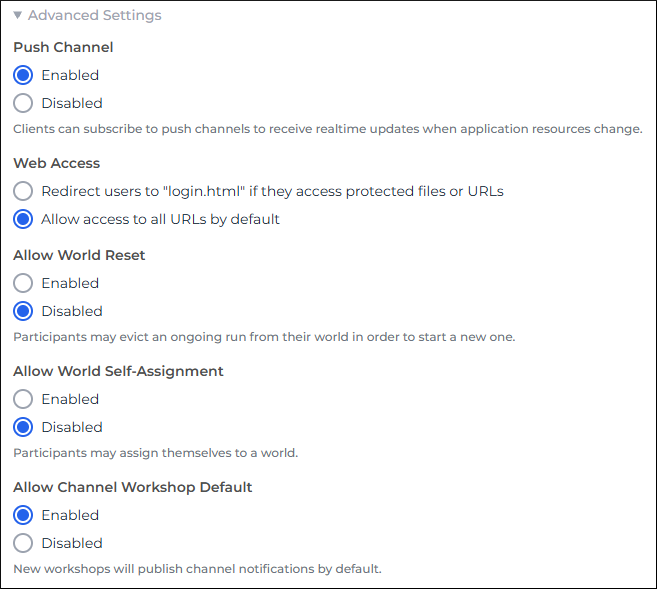
- Under General Settings, expand Advanced Settings.
- Under Push Channel, select Enabled.
- Under Web Access, select Allow access to all URLs by default.
- Under Allow Channel Workshop Default, select Enabled.
- At the bottom of the page, click Save Project Settings.
Deploy Project Files
Now let's clone the template repository to a local folder and deploy the model and the application UI to Epicenter.
In the steps below, replace my-project with a directory name of your choice.
In a local directory, run the following shell commands:
npx degit forio/dev-base-build#example my-project: to clone theexamplebranch to a local directory calledmy-project.cd my-project: to change to the new project directory.npm install: to install dependencies listed in\my-project\package.json.npm run deployto deploy the files to an Epicenter server. During the deployment, you must enter:SERVER: The Epicenter server URL (defaults tohttps://forio.com).ACCOUNT_SHORT_NAME: Your organization's account short name. It is displayed on the organization settings page under Organization ID.PROJECT_SHORT_NAME: The project short name.ADMIN_HANDLE: The email you used to log in when you created the project in the Epicenter UI.ADMIN_PASSWORD: Your Epicenter UI password.
These values are saved to \my-project\cli\config.json, which you can edit later.
Add users to your project
To allow people to use your Epicenter application, you create a workshop and add users to it.
- Create a workshop. For this project, you don't need to edit the optional workshop parameters.
- On the workshop page, follow these steps to add a user of type Facilitator.
- Repeat the steps to add a user of type Participant.
To learn about the Participant and Facilitator user types, read the admin guide on Users.
Configure the local instance
Edit the variable values in the \my-project\.env file:
VITE_PROJECT_NAME- this can be displayed in your application's UI as the app name.VITE_DEV_ACCOUNT_SHORT_NAME- this value must match your account short name.VITE_DEV_PROJECT_SHORT_NAME- this should match your project short name.VITE_DEV_API_HOST- the Epicenter API host for your server. Corresponds toSERVERabove, but without thehttps://prefix.
The VITE_DEV_* variables in the .env file are required only for your app's local instance. When the application runs on Epicenter, the values are inferred from the project's URL.
Run the application
Now you can run the application locally or on the Epicenter server.
Local instance
To start the app in development mode:
- In command line, go to your local
\my-projectfolder. - Run
npm run dev.
The application runs on http://localhost:8888/.
Run on Epicenter
To run your application on Epicenter:
- Open your project in Epicenter.
- Use one of these options to run the app:
- On the left, click Run Project.
- Click the project URL under the project name.
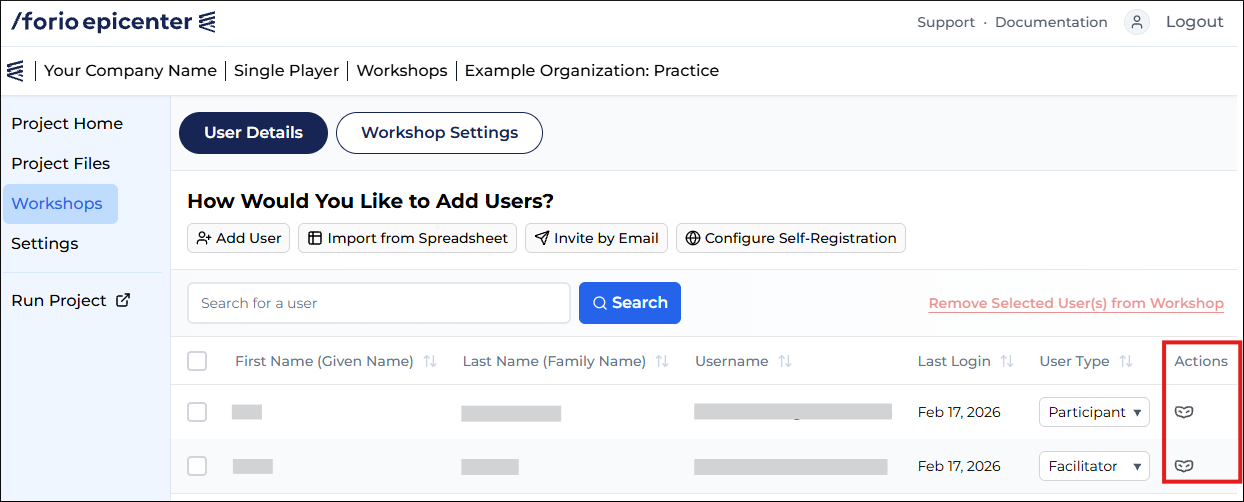
- Open a workshop and click the mask icon in the Actions column to log in as one of the users.
For example, here is a workshop in the single-player application with a Facilitator and a Participant:
Application structure
Here is a brief overview of some of the components of the template application.
- The
/src/main.tsxfile defines how requests are routed to the different parts of the application.RequireFocusedAuthchecks that the user is authenticated.PlayerShellis loaded for a participant.FacilitatorShellis loaded when a facilitator logs in to the application.PlayerHomedefines the elements on the participant's page in the sim. It gets variables from aRunQuery.
- Files in
/src/querydirectory contain wrappers around the JS library adapters.- In
run.ts,queryOptionsdefines how to fetch the data for the sim and how to cache it locally.queryFnfetches the data. - In
auth.ts,useLogin()calls theauthAdapter.login()function.
- In
- The
/src/routesdirectory contains components that handle various use cases. For example,/src/routes/login/handles login and password reset.