Load External Data
To update constant values in your model without modifying the model file, load the data from an external file at the start of a run.
You can use external data in your Vensim models if that external data is saved in any of the following file formats:
- CSV
- TAB
- TXT
- XLS
- XLSX
- VDF
From text or Excel files
The Vensim function GET XLS DATA is incompatible with Epicenter because it launches Excel, which is not what you need.
When loading data from an Excel file, you must use the function GET DIRECT DATA.
To instruct your model to load data values from a text or an Excel file:
- Use the Vensim function GET DIRECT DATA, referencing your data file.
- Place the Excel file with your data values in the project's
/modeldirectory alongside the model file.
The model loads the data values when a run starts.
Example
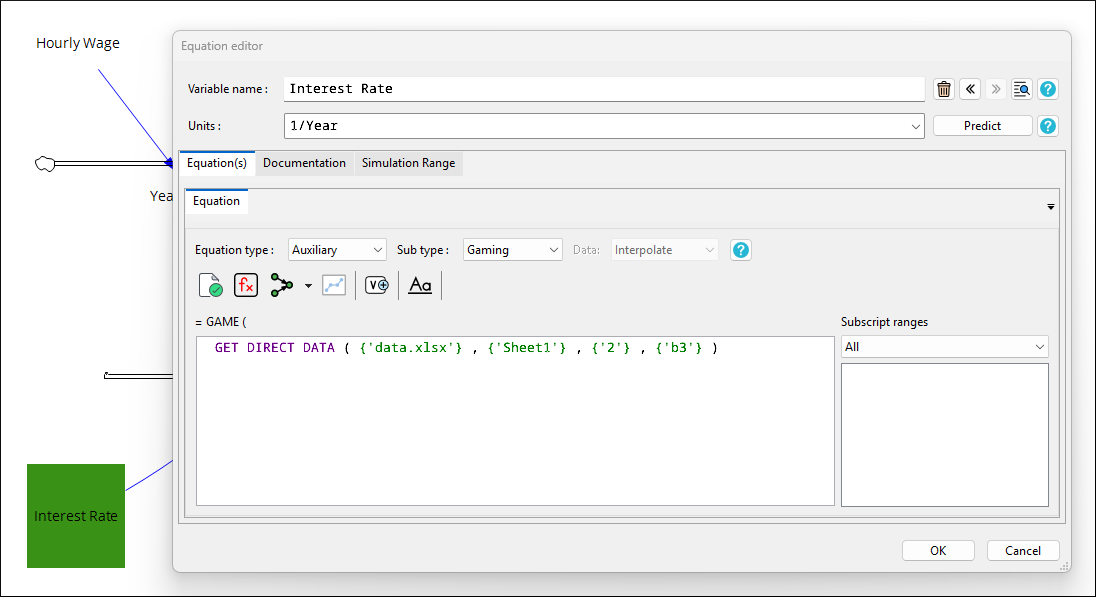
Let's say, we want to load a variable interest rate into the sample model from the XLSX file data.xlsx shown below.

We would provide the following arguments to the GET DIRECT DATA function:
- The name of the file
- The worksheet within the file
- The row in the file where the time step information is listed
- The cell in the file where the actual data begins
From VDF files
To load values from a VDF file, use the Vensim function GET VDF DATA.