About Vensim Models
Read this reference to learn how to use your Venism model in an Epicenter application.
Example model
To illustrate the concepts described below, we use a simple model that calculates a savings account balance given yearly income and spending, and an interest rate. Application users can update these variables as they play the game.
The example model can be downloaded here  .
.
Model file names
Epicenter accepts Vensim models as VMF or VMFX files.
To change your model file format in Vensim:
- Click File > Save As.
- Select
.vmfor.vmfxfile type. - Click Save.
Variables
Any Vensim variable can be reported and displayed in your Epicenter application interface.
Retrieving variables
When your application retrieves Vensim model variables from Epicenter, they are returned as arrays of consecutive values for all the steps in the current run.
To retrieve individual values, use one of the following options:
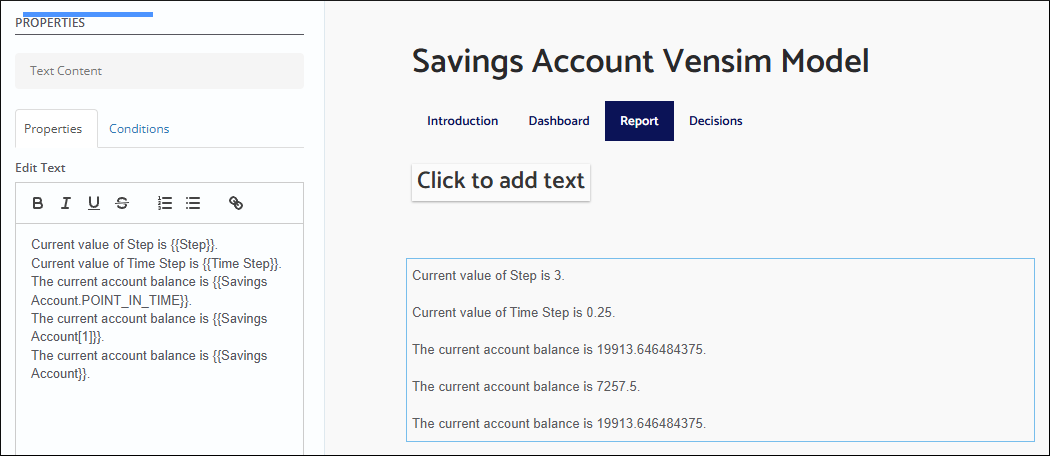
- To retrieve only the latest value of the variable, use the following notation:
<variable name>.POINT_IN_TIME. - To retrieve the value for a specific step, use the
[]array notation with the step number as the index:<variable name>[step number].
If you are building your app with the Epicenter Interface Builder, place the variable name inside double curly braces to display the value inline with other text on the page, as in the screenshot below.
When you reference a variable name without an index, the Interface Builder displays the latest value in the array by default.
Vensim subscripted variables are accessed using array notation:
- To retrieve the value for a specific subscript element:
<variable name>[subscript element]. - Optionally, specify a step number as the second index:
<variable name>[subscript element, step number]. - For multidimensional subscripted variables, you must explicitly specify both dimensions as
<variable name>[subscript element 1, subscript element 2]or use the wildcard symbol<variable name>[subscript element 1, *].
Vensim Lookup variables are represented in Epicenter as arrays. Each array element is itself an array with two elements: the x-y pair from the original Vensim variable. For example:
- Original Vensim Lookup representation: (2000,1),(2005,.5),(2010,1)
- Epicenter representation: [ [2000, 1], [2005, .5], [2010, 1] ].
Updating variables
For a turn-by-turn project, variables that can be updated from the application interface during the game must be created as Auxiliary Gaming equations.
Variables with Equation type: Constant can only be set once at the beginning of the game, when the Step variable is zero. In the example model, you can set the hourly rate at step zero.
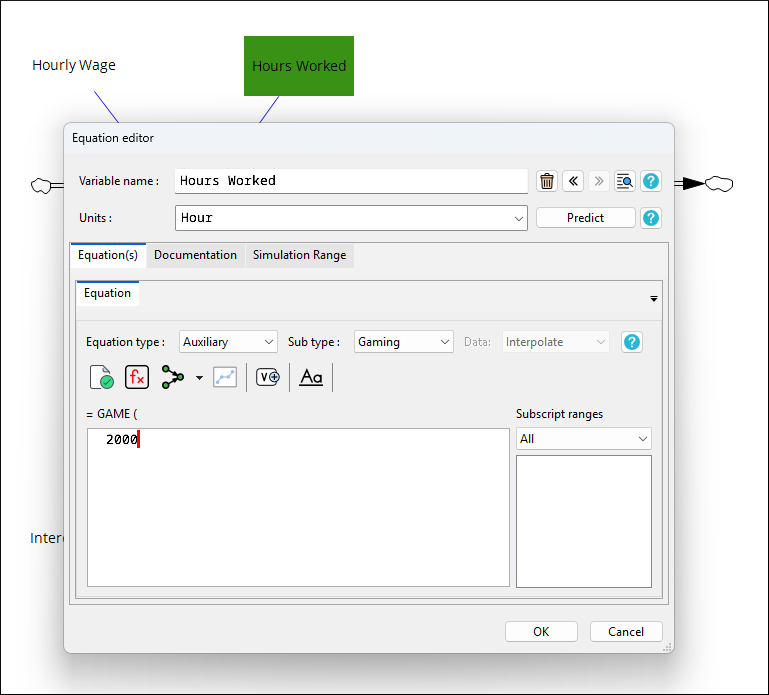
If you are building your application using the Epicenter libraries, it's important to remember that variable names are case-sensitive in Epicenter.
Loading values from external files
To make your project more robust and efficient, you can enable your Vensim model to load data from external files.
Constant values
Your model might have many constant values that get set before a run starts and affect the run outcome. To be able to update those values without modifying the model, configure your model to load data from an Excel or text file.
Variable values
To dynamically choose variable values at runtime, load data from CIN files.
For example, in a consumer behavior simulation, you could allow the facilitator to choose between a high- and a low-price-sensitivity mode before starting a run.
Additionally, you could load multiple CIN files. One might have price-sensitivity values, and another might be about cost structure.
Time and step variables
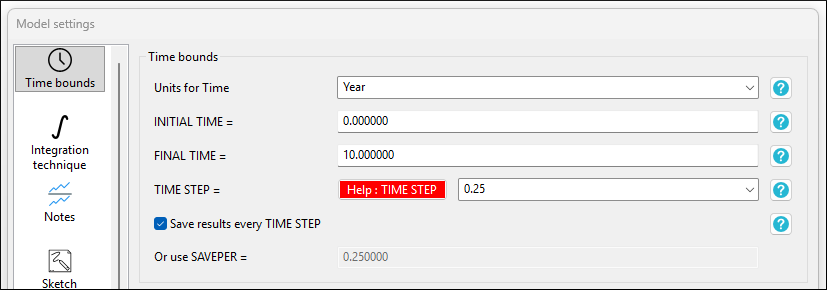
The Initial Time and Final Time model settings determine the time bounds in the game. In the example shown below, the unit of time is one year, the game starts at zero, and ends after 10 years have elapsed.
The Time Step model setting determines how much time elapses in the game with each model step. In our model, Time Step is 0.25. This means you calculate the earned interest every quarter of a year.
These time settings are available to the Epicenter application as model variables INITIAL TIME, FINAL TIME, and TIME STEP.
The Step variable is always an integer. It keeps count of how many times the model has stepped forward in the current run. At the beginning of the game, Step is equal to zero.
Saving variables to the database
To configure which variables get saved to the database, you must update the model context file.
To learn about the configuration options for saving variables to the database, read Vensim Model Context Example.
Operations
The step() operation advances the game by the specified number of game time units. If no argument is passed, the game advances by one time step. In our example, step() advances the game by a quarter of a year. step(1) advances the game by one year, forcing the model to make four steps forward.
The stepTo() operation advances the game to the specified time unit or to the end of the game. The argument can be:
- An integer value: The time unit to advance to.
- The string literal
"end": Advance to the end of the game.
In our example, stepTo(3) advances the game to year three.